A used car can look right, drive right and still carry a problem you cannot see: money owed on it, a police stolen marker, an insurance write-off, a mileage that has gone backwards, or a plate that has been swapped more than once. Each of those can be checked on its own. Buyers who want the whole picture want them together, in one document.
The Full Provenance Report is that document. It answers one question before you hand over any money: does this car’s recorded history match what the seller is telling you? This guide explains which sections it brings together, where the data comes from, what it cannot tell you, and what it costs. It covers the report bought without a Data Guarantee. A version with an Experian Data Guarantee also exists and is explained in a separate guide.

1. What the Full Provenance Report Is
It is the set-menu report on the SortedCars Paid Check builder. You enter the registration, pick a guarantee level on the Full Provenance Report card, and the report is built while you wait and shown on screen. Bought without a Data Guarantee it costs £5.99.
You will find the card on the Provenance tab, marked Set menu. The card describes the report as “stolen, outstanding finance, insurance write-off, mileage anomalies, keeper and plate history”, with provenance data provided by Experian. Below that is a choice headed “Choose your guarantee level” with four options: no Data Guarantee (£5.99), cover up to £10,000 (£9.99), cover up to £20,000 (£14.99) and cover up to £30,000 (£24.99). This guide is about the first option.
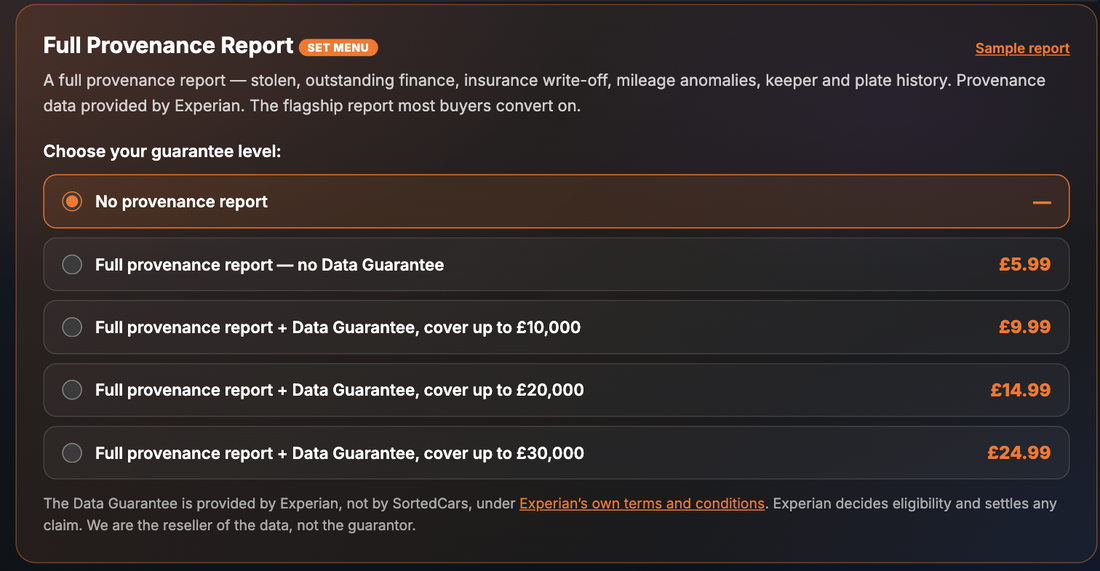
The card carries a footnote, printed on the site: “The Data Guarantee is provided by Experian, not by SortedCars, under Experian’s own terms and conditions. Experian decides eligibility and settles any claim. We are the reseller of the data, not the guarantor.” The report data is the same whichever option you choose; the cover level is what changes.
2. What the Report Shows
The individual checks on the Provenance tab that carry an “In Full Provenance” badge are the sections that make up this report. The report brings these sections together in one document. Every screenshot in this guide is taken on our test site and uses sample data: the registrations used there are official DVLA test numbers and the figures are fixed test records, not a real car. This guide has no report-page screenshot of the full report, so the sections below are described from the individual reports, each of which has its own guide.
The report opens with the vehicle details and the Experian identity sections, then runs through the provenance sections:
| Section | What it tells you |
|---|---|
| Vehicle Description | Make, model, colour, fuel and the other DVLA vehicle details for the registration you entered |
| Identity & Matching | Whether the plate, VIN and engine number on record match each other — see the Full Vehicle Identity Check guide |
| Status Markers | Scrapped, exported or imported markers held against the car |
| Plate & Colour History | Earlier registration marks and recorded colour changes — see the Plate & Colour History Check guide |
| V5C & Physical Identity Checks | Details to compare against the logbook and the car in front of you |
| Technical & Industry Codes | The technical identifiers the data provider holds for the vehicle |
| Outstanding Finance Check | Whether a lender has registered an HP, PCP or conditional sale agreement against the car — see the Outstanding Finance Check guide |
| Stolen Vehicle Check | Whether the car carries a Police National Computer stolen marker — see the Stolen Vehicle Check guide |
| Mileage & Clocking Check | Odometer readings in date order and a verdict on whether any goes backwards — see the Mileage & Clocking Check guide |
| Write-off / Condition & Damage History | MIAFTR insurance loss records with category and date of loss — see the Write-off & Salvage Check guide |
| Keeper & Owner History | How many previous keepers the car has had and when the last change was — see the Keeper & Owner History Check guide |
| Plate Change / Colour Change History | The dated list of plate and colour changes behind the summary above |
3. Why It Matters
Each provenance problem costs you in a different way. Outstanding finance means the lender still owns the car and can pursue it after you have paid. A stolen marker means the car can be seized and returned to its rightful owner. An undisclosed write-off changes what the car is worth and what some insurers will cover. A clocked mileage means you are paying for a younger car than you are getting. A run of keeper changes in a short time is a question you want answered before you buy, not after.
Buying the checks one at a time works, but it is easy to skip one. The Full Provenance Report puts the whole recorded history in front of you at once for £5.99, so the decision is made on the complete picture. And a seller who discourages you from running it has told you something useful.
4. Where the Data Comes From
The provenance data in this report is provided by Experian. Lenders register finance agreements, the police record stolen markers, insurers record losses on the MIAFTR register, and mileage readings come from MOT tests, keeper changes and other records. The report reads what Experian holds for the registration you enter. The vehicle details at the top of the report come from the DVLA.
SortedCars does not hold or create these records. We ask Experian for the record on the car at the moment you build the report and show you every value we receive.
5. What It Cannot Tell You
An honest report comes with honest limits.
- It is not a taxi check, a recall check, a service history or a valuation. Those are separate reports on the Paid Check page: the Taxi & Private-Hire Check, the Safety Recall Check, the OE Service History Report and the Current Valuation Report. Do not assume they are inside this one.
- Only registered records appear. A finance agreement a lender has not registered, or a loss an insurer has not reported, cannot be seen by any check. Each section can only show what its source holds.
- It is a snapshot. The result is correct at the moment the report is built. Run it close to the day you pay.
- It does not inspect the car. A clean record does not tell you about a bad repair, a worn clutch or a tyre on the limit. Look at the car, or have someone qualified look at it.
- The £5.99 version has no Data Guarantee. The report header will say so. If a value in the report later turns out to be wrong, there is no Experian cover behind this version. The version with cover is explained in the Data Guarantee guide.
Check a Car’s Full History
Check its history before you buy — free DVLA and MOT data in seconds.
6. What To Do With the Result
A clean report is not the end of the job, and a flagged section is not automatically the end of the deal. Work through the sections in order.
Step 1 — Deal with the identity sections first. If the plate, VIN and engine number do not match, or the V5C details do not match the report, stop. A mismatch can mean a cloned car. Compare the VIN on the car, the V5C and the report before you go further, and read our guide on how to spot a cloned car. If you believe the car is stolen or cloned, contact the police on 101 or through police.uk.
Step 2 — Then the money and the markers. Finance on record needs a settlement letter from the lender before you pay anyone. A stolen marker means walk away and report it. A write-off record means a professional inspection and a price to match.
Step 3 — Then the history. Put the mileage readings next to the MOT history and the keeper count next to the car’s age. Ask the seller about anything that does not fit.
Step 4 — Keep the report. It is dated and shows what was on record before you bought. If a seller has misled you, report it to Action Fraud. For your rights as a buyer, Citizens Advice has free guidance.
7. Price and Where It Sits
| How to buy it | Price | What you get |
|---|---|---|
| Full Provenance Report, no Data Guarantee | £5.99 | All the sections listed above in one report — provenance data provided by Experian |
| Essential Pack | £5.99 | Includes the Full Provenance Report without a Data Guarantee |
| Complete Pack | £8.99 | Includes the Full Provenance Report without a Data Guarantee |
| Complete + EV Pack | £11.99 | Includes the Full Provenance Report without a Data Guarantee |
| Shortlist Pack | £11.99 | Includes the Full Provenance Report without a Data Guarantee — covers 3 cars |
| Complete + History Pack | £14.99 | Includes the Full Provenance Report without a Data Guarantee |
Packs with an Experian Data Guarantee start at £7.49. Prices are as shown on the site at the time of writing; the page price is always the price you pay.
Final Thoughts
The Full Provenance Report is the one document that puts finance, stolen, write-off, mileage, keeper and plate history in front of you together. At £5.99 without a Data Guarantee it is the plain version: the same data, no cover behind it. Run it before you agree a price and keep it as your record.
If you want Experian cover on the data as well, the same report can be bought with a Data Guarantee at three cover levels. That version, and what the guarantee does and does not add, is covered in the companion guide.
This guide provides general information and is not legal or financial advice. Provenance data in the Full Provenance Report is provided by Experian and shows the finance, stolen, write-off, mileage, keeper and plate records registered against the vehicle at the time the report is built; it cannot show a record that has not been registered with the source, and it does not inspect the car. If a seller misleads you about a car’s history, report it to Action Fraud; if you believe a car is stolen or cloned, contact the police on 101. The Data Guarantee is Experian’s, provided under Experian’s own terms; this article covers the report bought without it. SortedCars resells the data named above and has no other connection with the providers, garages or insurers mentioned.
Frequently Asked Questions
Check Any Car’s History for Free
MOT history, mileage analysis, and DVLA data — completely free with SortedCheck.