Two cars with the same badge, the same engine and the same year can be a thousand pounds or more apart, and the difference is often what was ticked on the order form when the car was new. Adverts are full of “high spec”, “fully loaded” and “every option”. Some of that is true. Some of it is the seller remembering the car more generously than the factory built it.
The Factory Build Sheet answers one question: what equipment did the manufacturer actually fit to this car, by its VIN, when it left the factory? This guide explains what the report shows, where the data comes from, what it cannot tell you, and how to use it to check a car’s spec before you pay for it.

1. What the Factory Build Sheet Report Is
It is a single paid report inside the SortedCars Paid Check builder. You enter the registration, tick the report, and it is built while you wait and shown on screen. It costs £5.99.
The card is headed “Factory Build Sheet — Exactly how it left the factory.” on the Paid Check page. It has no extra inputs: the registration is enough, because the build data is tied to the car’s VIN.
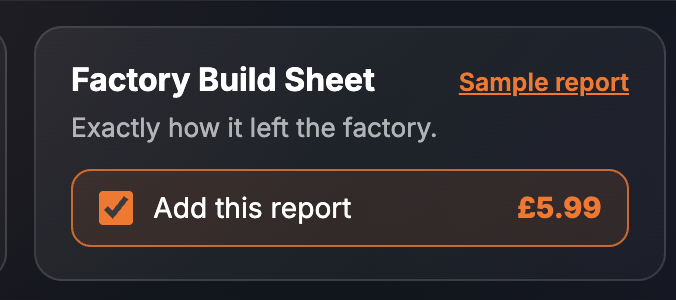
It is the more expensive of the two spec reports on the page. The cheaper Spec & Options report (£1.99) describes the model and its technical data; the Build Sheet is about the individual car and the option codes fitted to it. They answer different questions.
2. What the Report Shows
The finished report has one section, the Factory Build Sheet. Every screenshot below is sample data from our test environment: the registration is an official DVLA test number and the derivative and option shown are fixed test records, not a real car.
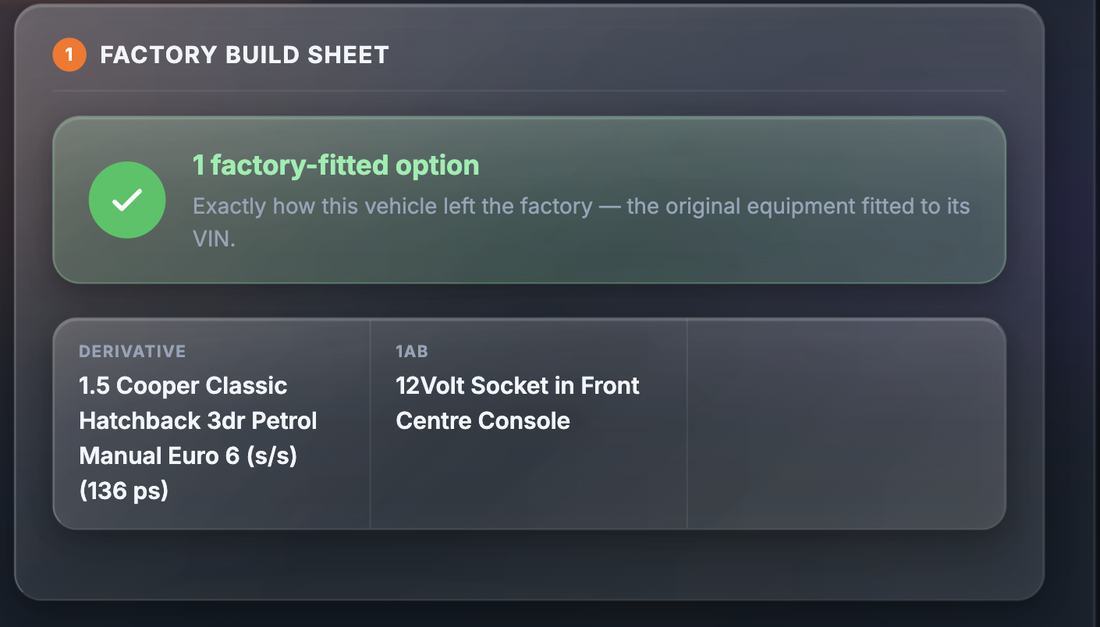
The section opens with a banner counting the factory-fitted options, described in the report as exactly how this vehicle left the factory: the original equipment fitted to its VIN. Below that:
| Field | What it tells you |
|---|---|
| Derivative | The exact version the manufacturer built — engine, trim, body, doors, fuel, gearbox, emissions standard and power, in the sample “1.5 Cooper Classic Hatchback 3dr Petrol Manual Euro 6 (s/s) (136 ps)” |
| Option code and description | One field per factory option, showing the manufacturer’s code and what it means — in the sample, code “1AB” is “12Volt Socket in Front Centre Console” |
The sample shows one option because it is a fixed test record. A real car returns a field for each option code the manufacturer holds against that VIN, so a well-specified car can produce a long list. The option codes are the manufacturer’s own, which is why each one comes with a description.
3. Why It Matters
Options are where used-car prices get padded. A seller can honestly believe the car has a feature it does not, because a badge on the boot or a button on the dash looks like one. A seller can also know perfectly well that the “upgraded sound system” is the standard one. Either way, you pay for it.
There is a second reason. Retro-fitted equipment — wheels, infotainment, tow bars, body kits — is not the same as factory-fitted, and it is not necessarily fitted to the same standard. A build sheet lets you separate what the manufacturer put on the car from what someone added later, and ask about the later work.
The third reason is the quiet one: identity. The build sheet is tied to the VIN. If the car in front of you has a different engine, trim or body from the derivative on its build sheet, something has changed since it left the factory, and you want to know what. Our guides to spotting a cloned car and the VIN Decode report cover that side in more depth.
4. Where the Data Comes From
The build sheet is sourced via OneAuto from manufacturer original-equipment data. The manufacturer holds the record of how each VIN was specified when it was built; OneAuto supplies that record for the registration you enter.
SortedCars does not hold or create build records. We ask OneAuto for the build sheet at the moment you build the report and show you every value we receive. Coverage depends on the manufacturer making build data available — where it does not, there is no sheet to show.
5. What It Cannot Tell You
A build sheet is a record of the factory, and it stops at the factory gate.
- It cannot show what was added later. Dealer-fit and aftermarket equipment is not on the sheet. A missing option code does not mean the feature is absent; it means the factory did not fit it.
- It cannot show what was removed or has failed. A factory-fitted option that has since been swapped, broken or stripped out still appears, because the sheet records the build, not the car today.
- Coverage depends on the manufacturer. Where a manufacturer does not make build data available, the report cannot return it.
- It is not a valuation. It tells you what was fitted, not what the options are worth now. For a figure, use the Current Valuation report.
- It is not a history check. Keepers, mileage, finance, write-offs and theft are separate reports in the Car History section.
Check a Car’s Full History
Check its history before you buy — free DVLA and MOT data in seconds.
6. What To Do With the Result
Step 1 — Check the derivative against the advert. Trim, engine, gearbox and body should match. If they do not, ask the seller to explain before anything else.
Step 2 — Tick off the advertised options. Go through the advert’s list of features and find each one on the build sheet. Anything you cannot find is either aftermarket, standard equipment the seller has counted as an option, or not there at all.
Step 3 — Ask about the gaps. Retro-fitted equipment is not a reason to walk away, but it is a reason to ask who fitted it and whether there is an invoice. It is also a reason not to pay a factory-option premium for it.
Step 4 — Check the options still work. The sheet says what was fitted, not what still functions. Try each one on the test drive.
If a dealer has described a car as having equipment it does not have, that is a misdescription and you have rights under consumer law. Citizens Advice explains what you can do, and GOV.UK sets out what to check before buying a vehicle. Private sales give you fewer rights, which is a good reason to check the spec before you pay rather than after. Our Buyer Tips cover the rest.
7. Price and Where It Sits
| How to buy it | Price | What you get |
|---|---|---|
| Factory Build Sheet on its own | £5.99 | The derivative and each factory option code with its description, for the car’s VIN |
The Factory Build Sheet is bought on its own from the Paid Check page. For the model-level technical data instead, the Spec & Options report is £1.99. Prices are as shown on the site at the time of writing; the page price is always the price you pay.
Final Thoughts
Spec is the easiest thing for a seller to overstate and the hardest thing for a buyer to check by eye. For £5.99, built while you wait, the Factory Build Sheet replaces the seller’s memory with the manufacturer’s record.
Check the derivative, tick off the advertised options, ask about anything that is not on the sheet, and try each option on the test drive. Then decide what the car is worth to you.
This guide provides general information and is not legal advice. The Factory Build Sheet is sourced via OneAuto from manufacturer original-equipment data and records how the vehicle was specified when it was built; coverage depends on the manufacturer making build data available, and the sheet cannot show equipment added, removed or failed since the car left the factory. If a car has been misdescribed by a dealer, Citizens Advice explains your rights. SortedCars resells the data named above and has no other connection with the providers, manufacturers or dealers mentioned.
Frequently Asked Questions
Check Any Car’s History for Free
MOT history, mileage analysis, and DVLA data — completely free with SortedCheck.