The price on the windscreen is the easy number. The hard number is what the car will cost to keep on the road: services, tyres, the MOT and the repairs that turn up between them. Buyers who skip this sum find it out one invoice at a time.
The Servicing & Repair Forecast answers two questions before you commit: roughly what should I budget for upkeep at my mileage, and what does the manufacturer say this model needs and when? This guide explains what the two parts show, where the figures come from, what they cannot tell you, and how to use them when you look at a car.

1. What the Servicing & Repair Forecast Is
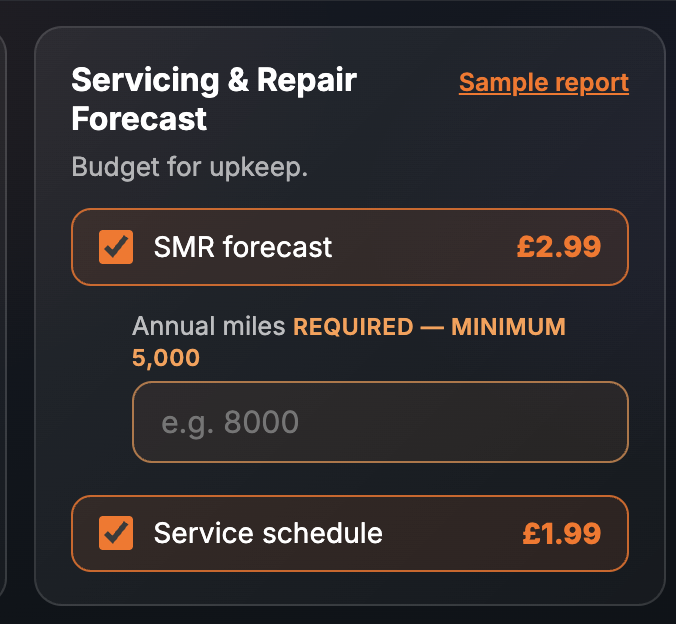
It is a paid report inside the SortedCars Paid Check builder, and it comes in two parts you can tick separately. The SMR forecast (servicing, maintenance and repair) costs £2.99. The Service schedule costs £1.99. Tick one or both, enter the registration, and the report is built while you wait and shown on screen.
On the Paid Check page the card is titled Servicing & Repair Forecast with the strapline “Budget for upkeep”. The SMR forecast has a required input: your annual miles, with a minimum of 5,000. The forecast is scaled to that figure, so enter the mileage you expect to do. With both parts ticked, the report’s coverage line reads “2 paid reports + DVLA vehicle details” and its header carries a “NO DATA GUARANTEE” badge.
2. What the Report Shows
The finished report opens with the vehicle details from the DVLA — registration, make, model, colour, year and fuel — then the SMR Forecast section, then the Service Schedule section. Every screenshot below is sample data from our test environment: the registration is an official DVLA test number and the pound figures, capacities and intervals are fixed test records, not a real car and not a real forecast.
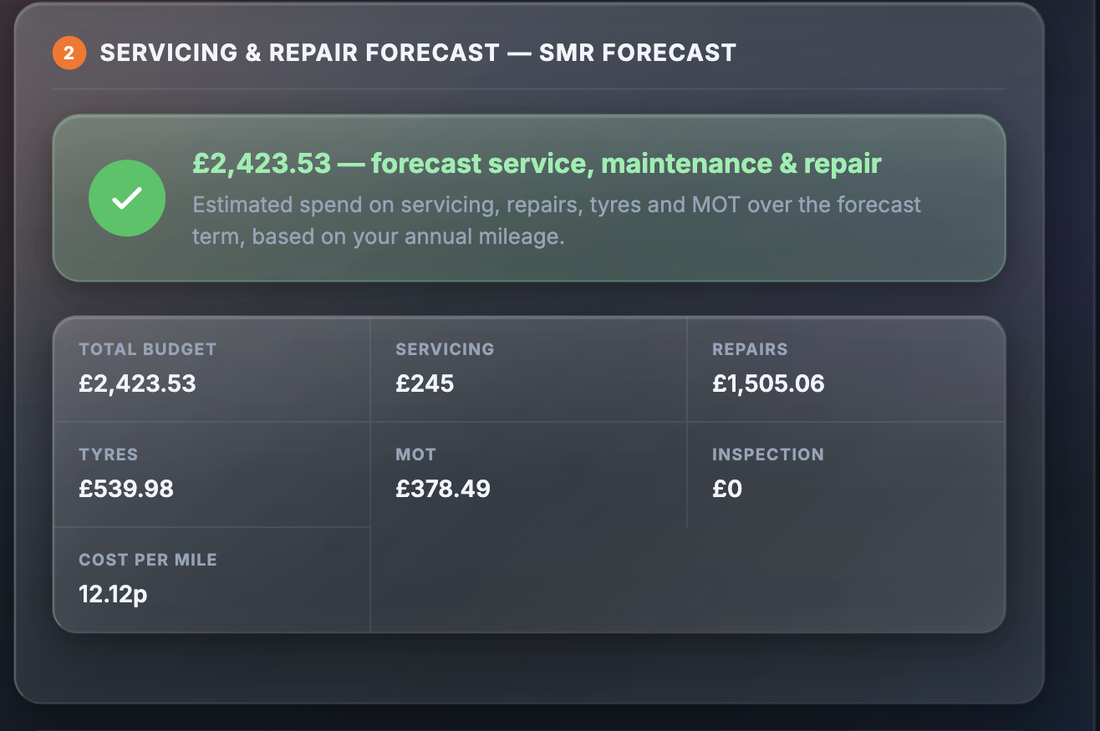
The SMR Forecast section leads with a verdict — the estimated spend on servicing, repairs, tyres and MOT over the forecast term, based on your annual mileage — and then breaks it down:
| Field | What it tells you |
|---|---|
| Total budget | The forecast spend across every category over the forecast term |
| Servicing | The share of the total expected to go on routine services |
| Repairs | The share expected to go on unscheduled repairs and wear items |
| Tyres | The expected tyre spend at your annual mileage |
| MOT | The expected cost of MOT tests over the term |
| Inspection | Any inspection cost the model includes for this vehicle; it can be zero |
| Cost per mile (pence) | The total divided over the miles in the term, so you can compare cars that you would drive different distances |
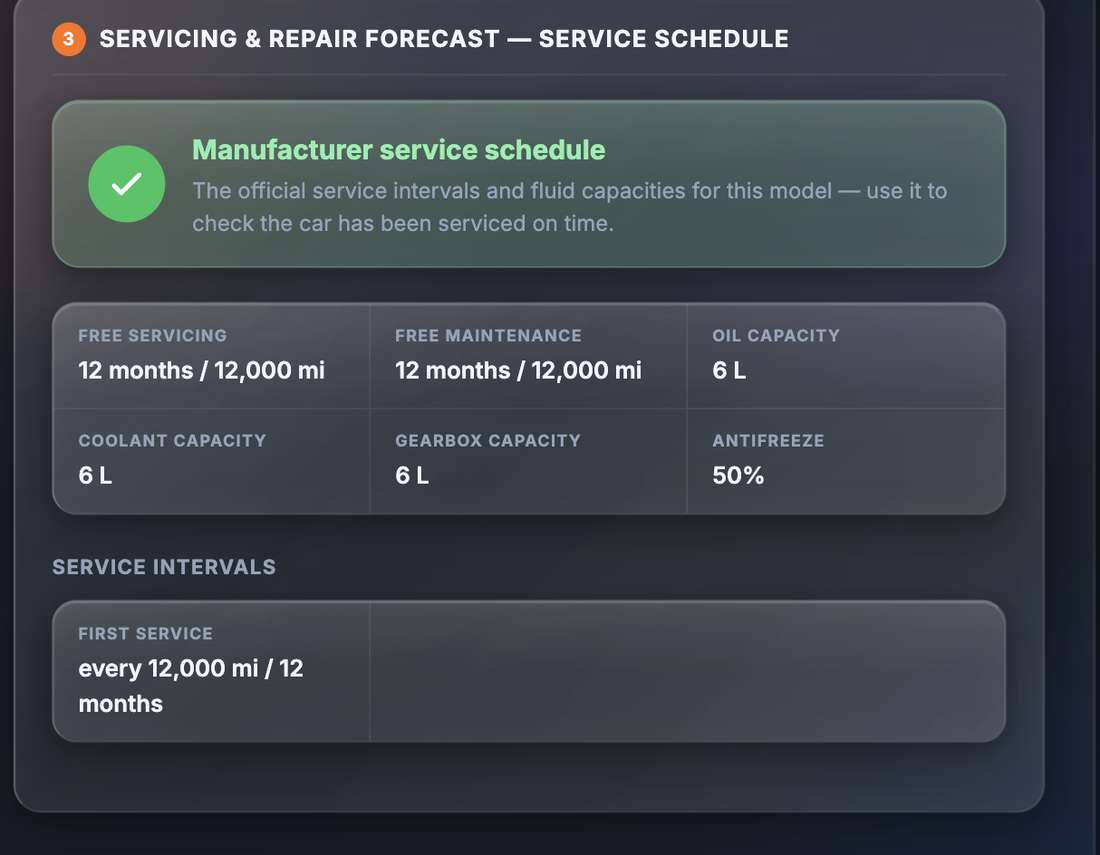
The Service Schedule section is a different kind of information. It is the manufacturer’s schedule for the model — the official intervals and fluid capacities — so you can check the car in front of you has been serviced on time:
| Field | What it tells you |
|---|---|
| Free servicing (months/miles) | The period of free servicing the maker offered when the car was new |
| Free maintenance | The free maintenance period the maker offered when new |
| Oil capacity | How much engine oil the model takes at a change |
| Coolant capacity | The cooling system capacity |
| Gearbox capacity | The gearbox oil capacity |
| Antifreeze % | The antifreeze concentration the maker specifies |
| Service intervals | A list of each service and when it falls due, in miles and months. The sample shows a single “First service” entry; a real car lists each service in the schedule |
3. Why It Matters
Depreciation and fuel get the attention, but upkeep catches buyers because it is irregular. A year can pass with only a service, then tyres, a brake job and an MOT advisory land in the same month. A forecast turns that lumpy spend into a single figure you can set against your budget before you buy.
The forecast also makes cars comparable. Two cars at the same price can have very different upkeep profiles, and the Cost per mile figure puts them on the same footing.
The schedule matters for a different reason. Without it you are taking the seller’s word that “it’s been serviced regularly”. With it, you can check the claim against dates and mileages, and you know which service is due next.
None of this replaces an inspection. The MOT history — free at gov.uk/check-mot-history and in the free SortedCars check — tells you what testers found on this specific car; see our guide to reading MOT history.
4. Where the Data Comes From
Both parts of this report are provided by Solifi. The SMR forecast is a model of expected servicing, maintenance and repair spend for the vehicle at the annual mileage you enter. The service schedule is the manufacturer’s published schedule for the model. The vehicle details at the top of the report come from the DVLA, with MOT-related vehicle data from the DVSA. The report’s source line reads “DVLA · Solifi”.
SortedCars does not hold or create these forecasts or schedules. We ask Solifi for the figures on the car at the moment you build the report and show you every value we receive.
5. What It Cannot Tell You
An honest forecast comes with honest limits.
- The forecast is a model, not a quote. It is an estimate of expected spend for the vehicle at your mileage. No garage is bound by it, and it is not an offer from anyone.
- Real garage prices vary. Labour rates, parts prices and where you live all move the actual bill. Treat the figures as a planning budget, not a price list.
- It does not know this car’s condition. The forecast is for the vehicle type at your mileage. A car that has been neglected will cost more; a cherished one may cost less. Only an inspection tells you which.
- The schedule is not proof of servicing. It is the maker’s schedule for the model. It shows what should have happened, not what did. Stamps, invoices and manufacturer records are the evidence.
- It only holds what the maker publishes. Real cars list each service in the schedule, but nothing beyond the maker’s published schedule for that model appears.
- The mileage you enter drives the result. Enter a figure that is too low and the forecast will be too low.
Check a Car’s Full History
Check its history before you buy — free DVLA and MOT data in seconds.
6. What To Do With the Result
Step 1 — Put the total into a yearly budget. Set the total budget and the cost per mile next to fuel, insurance and road tax. If the combined figure does not fit, better to know now.
Step 2 — Check the schedule against the evidence. Match each interval to a stamp, an invoice or a manufacturer record. Note any service that is overdue or missing. If the seller has no records at all, price that in or walk away.
Step 3 — Read the MOT history alongside it. Advisories for tyres, brakes or suspension are real, dated observations on this car. Where the forecast says “tyres” and the MOT history says “tyre worn close to legal limit”, the bill is close. Use gov.uk/check-mot-history for the official record.
Step 4 — Use it in the negotiation. A service that is due now is a cost you will pay in the first month. It is reasonable to ask the seller to have it done, or to reflect it in the price.
If a dispute arises with a garage over work done later, Citizens Advice explains your consumer rights.
7. Price and Where It Sits
| How to buy it | Price | What you get |
|---|---|---|
| SMR forecast on its own | £2.99 | The forecast section plus the DVLA vehicle details. Single purchase only — not in any pack |
| Service schedule on its own | £1.99 | The manufacturer schedule section plus the DVLA vehicle details |
| Complete Pack | £8.99 | Includes the service schedule alongside the running-cost and valuation reports |
| Complete + EV Pack | £11.99 | Complete Pack with the electric-vehicle reports; includes the service schedule |
| Complete + History Pack | £14.99 | Complete Pack with the history reports; includes the service schedule |
| Premium Protected Pack | £24.99 | The full set of reports with protection included; includes the service schedule |
The SMR forecast is not included in any pack: if you want it, tick it on the Paid Check page as a single purchase. Neither part is in the Full Provenance Report. Prices are as shown on the site at the time of writing; the page price is always the price you pay.
Final Thoughts
Upkeep is the running cost buyers plan for least and feel most. For £2.99 the SMR forecast gives you a budget figure and a cost per mile for the vehicle at your mileage; for £1.99 the service schedule gives you the maker’s intervals and capacities to check the car’s history against.
Use the forecast as a planning number, not a price. Use the schedule as a checklist, not proof. Read both alongside the MOT history and an inspection of the actual car, and you will know what you are taking on before the first invoice arrives.
This guide provides general information and is not legal or financial advice. The SMR forecast and service schedule are provided by Solifi at the time the report is built; the forecast is a model of expected spend for the vehicle at the mileage you enter, not a quote, and real garage prices vary, while the schedule is the manufacturer’s schedule for the model and is not evidence that this car was serviced. SortedCars resells the data named above and has no other connection with the providers, garages or insurers mentioned.
Frequently Asked Questions
Check Any Car’s History for Free
MOT history, mileage analysis, and DVLA data — completely free with SortedCheck.